
Well, Fuselink is for you. It's a tiny USB device that plugs into your Cerbo GX, reads your Lynx Distributor chain, and shows the fuse pages natively in the Victron UI. No SSH. No Node-RED. No file editing.
Includes the Fuselink unit and a 1.5 m USB cable. Free UK delivery.

Venus OS already has beautiful Lynx Distributor fuse pages built in. They just need something to feed them data. Fuselink is that something.
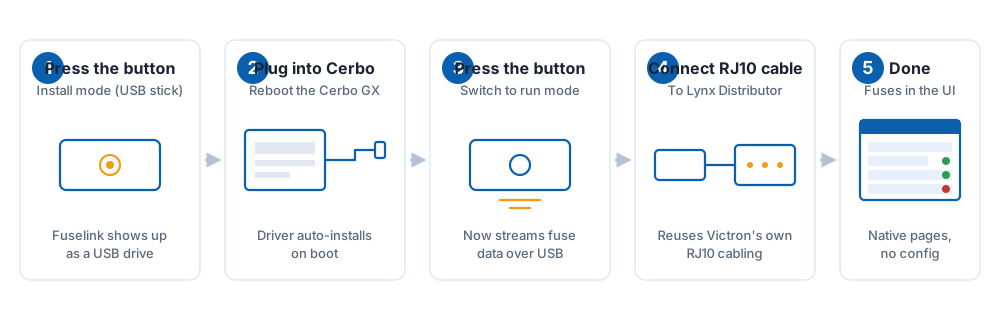
One USB cable to the Cerbo, one RJ10 to your distributor chain. The driver auto-installs at boot. You never open a terminal.
Fuse pages appear in the standard Victron menu — the same ones used by the Lynx Smart BMS. Tap a fuse to name it, see status, and get alarms.
Reads a full chain of four Lynx Distributors over a single RJ10 cable. Set each distributor's 2-way DIP switch to a unique address (0–3) and you're done.
Fuselink only reads. It never sends commands, never touches DVCC, never affects your chargers. Safe to leave installed permanently.
When Fuselink talks to the chain, the distributor's own power indicator turns on — visible confirmation that the bus is alive.
Hold the button to enter Wi-Fi recovery mode, connect to a captive portal, and update firmware straight from fuselink.uk.
Designed for installers who don't want to read documentation — and customers who never want to see a terminal prompt.
Each Lynx Distributor has a 2-way DIP switch on the back that selects an I²C address from 0 to 3. That gives you four distributors per chain — sixteen monitored fuses in total.
The 5 V supply on the chain is the same one Victron's own kit uses; Fuselink's USB feed has plenty of headroom for the full chain (we've sized for ~50% margin on a standard USB port).
Read the wiring guide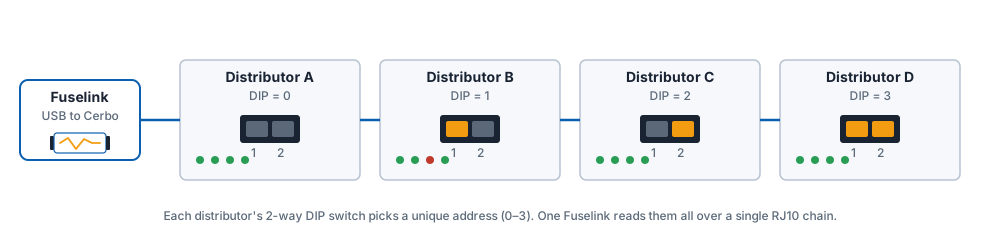
Fuselink unit + 1.5 m USB cable. Free UK delivery. No subscription, no cloud account, no fuss.
Buy nowQuestions first? Read the FAQ or get in touch.