
Fuselink is a small USB-attached device that lets your Victron Cerbo GX read fuse-state information from a Victron Lynx Distributor chain. Without Fuselink, the Cerbo's built-in Lynx Distributor fuse pages can only be populated by an expensive Lynx Smart BMS. Fuselink lights up the same UI pages using inexpensive hardware and a clean USB install flow.
It is read-only by design: it cannot send commands to anything on the bus and is explicitly designed not to participate in charge-control logic, so it can't affect your chargers or your battery.
You will also need a standard Victron RJ10 (4P4C) cable to connect Fuselink to your first Lynx Distributor. These ship with every Lynx Distributor, and Fuselink is designed to reuse one you already have. If you need a fresh one, any 4P4C straight-through cable will do (3–5 m is a good length).
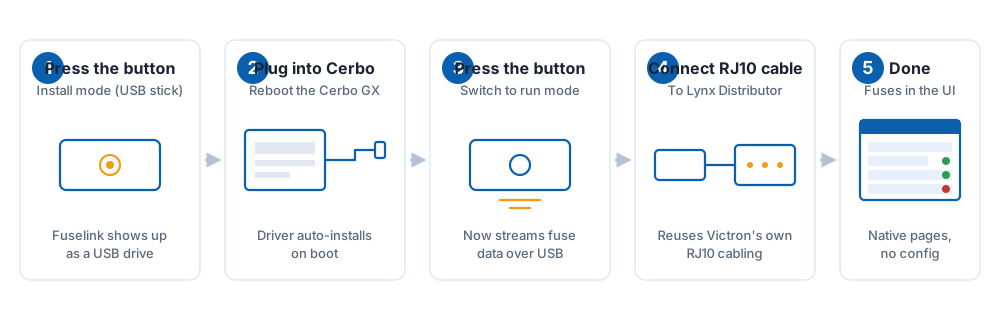
Designed for first-time installers. Five steps, around two minutes:
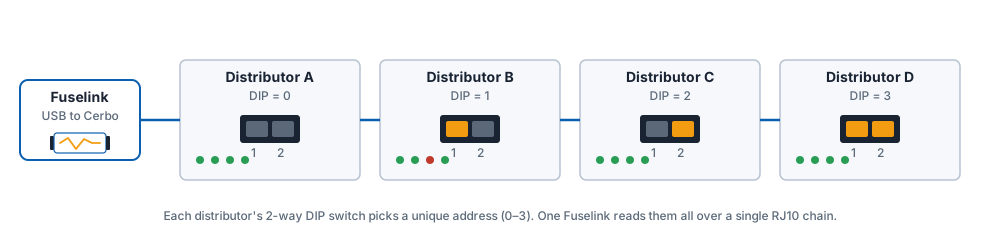
One Fuselink supports up to four Lynx Distributors on a single RJ10 chain. Each distributor must have a unique I²C address (0, 1, 2 or 3), set with the 2-way DIP switch on the back of the distributor.
| DIP switch 1 | DIP switch 2 | Address | Distributor letter in Cerbo UI |
|---|---|---|---|
| OFF | OFF | 0 | A |
| ON | OFF | 1 | B |
| OFF | ON | 2 | C |
| ON | ON | 3 | D |
Order on the physical chain does not have to match the DIP-switch order — distributors are identified by address, not by their position on the cable. We recommend setting addresses sequentially from the Fuselink end, just to keep things tidy.
A standard USB port supplies 500 mA. Fuselink itself draws ~80 mA in run mode, and each Lynx Distributor's logic supply pulls 20–40 mA from the chain. Worst case for four distributors: about 240 mA — well within budget. No external 5 V supply is required.
| Colour | Behaviour | Meaning |
|---|---|---|
| Blue | Solid | Install mode — Fuselink is a USB mass-storage device. Plug into Cerbo and reboot to install the driver. |
| Green | Solid | Run mode — streaming fuse data to the Cerbo over USB-serial. |
| Green | Quick blink (1 Hz) | Run mode and reading a distributor — normal operation. |
| Amber | Pulsing | Wi-Fi recovery mode — connect to the captive portal to update firmware. |
| Red | Solid | Fault. Unplug, wait 5 seconds, plug back in. If it persists, see Troubleshooting. |
| Red | Slow blink | RJ10 chain found, but no distributor responded. Check DIP switches and cabling. |
| None | — | No power. Check the USB cable and Cerbo port. |
Everything Fuselink does is driven by its single front-panel button. There are three gestures:
| Gesture | What it does |
|---|---|
| Hold for 5 seconds | Switches between Install mode and Run mode. The LED changes colour to confirm (blue = install, green = run). |
| 3 quick presses, then hold for 10 seconds | Enters Wi-Fi recovery mode for firmware updates. The LED pulses amber. The two-step gesture means you can't trigger it by accident. |
| 5 quick presses | Factory reset — clears your Wi-Fi details and settings and returns the device to install mode. Your device's identity is kept, so it stays known to the firmware-update service. |
A brief single press on its own does nothing — this is deliberate, so a knock or a curious finger can't change the device's mode.
Fuselink Setup and join it.Each Fuselink checks in over an authenticated connection, so only genuine Fuselink devices can pull firmware updates. If a check ever fails, the device simply keeps running its current firmware — an update is never required for the device to work.
The distributor is responding to Fuselink (so the I²C side is healthy) but reports no 48 V/24 V/12 V on its busbar. Check your main DC connections to the distributor's busbar.
Fuselink is in run mode and trying to read the chain, but no distributor at any of the four addresses (0–3) replied within the timeout. Check the RJ10 cable and that at least one DIP switch is set to a valid address.
Internal fault — usually a transient. Unplug, wait five seconds, plug back in. If it persists for more than two power cycles, contact support with the LED behaviour and your Cerbo's Venus OS version.
The gesture is 3 quick presses then a 10-second hold — check the LED is pulsing amber before you look for the network. Some phones cache "captive portal: no internet" warnings — try forgetting the Fuselink Setup network and reconnecting.
| USB connector | USB-C, USB 2.0 Full-Speed |
|---|---|
| Distributor connector | RJ10 (4P4C), Victron-compatible pinout |
| Power | Bus-powered, 5 V via USB |
| Current draw (run mode) | ~80 mA |
| Current draw (Wi-Fi recovery) | ~180 mA peak |
| Distributors per unit | Up to 4 (DIP switch addresses 0–3) |
| Operating temperature | –10 °C to +60 °C |
| Enclosure | Vented ABS, IP30 |
| Wi-Fi | 2.4 GHz 802.11 b/g/n, used only in recovery mode |
| Dimensions | ~60 × 30 × 14 mm |
| Weight | ~22 g (excluding cable) |
Fuselink is a low-power 5 V USB device with no exposed conductors and no path to the high-current DC side of your Lynx Distributor. The RJ10 port carries only logic-level signalling and the 5 V supply from the distributor.
Do not modify the device or operate it outside the temperature range above. The device is for indoor use only.
Fuselink is a read-only telemetry source. It cannot inhibit charging, change BMS state, or affect inverter behaviour.
Warranty: 12 months from delivery, covering manufacturing defects. Excludes damage from misuse, modification, or operation outside the documented specifications.
Returns: 30 days, no questions asked. Send the unit back in any condition with the original cable; we refund the full purchase price (you cover return postage).
To start a return or warranty claim, email support@fuselink.uk with your order reference.
Fuselink is an independent product. "Victron Energy", "Lynx", "Lynx Distributor", "Cerbo GX" and "Venus OS" are trademarks of Victron Energy B.V. and are used here only to describe compatibility.